Official Expense Reimbursement Policy
Jump directly to the official policy section for reimbursable and non-reimbursable expenses.
FSI How to Use
Follow role-based onboarding and workflow guidance for employee, supervisor, and finance users.
Getting Started
Set up your account and learn where to submit expense reports.
Report Submission
Build complete expense reports with clear descriptions and totals.
Supervisor Review
Understand how supervisors assess pending reports and request updates.
Approvals & Statuses
Track what each report status means from draft through final decision.
Finance & Export
Code approved reports, clear them for export, and finalize payouts.
Receipts
Prepare and attach proof-of-purchase documentation that passes review.
Account Management
Maintain secure access with updated profile details and password hygiene.
Report Submission
Build complete expense reports with clear descriptions and totals.
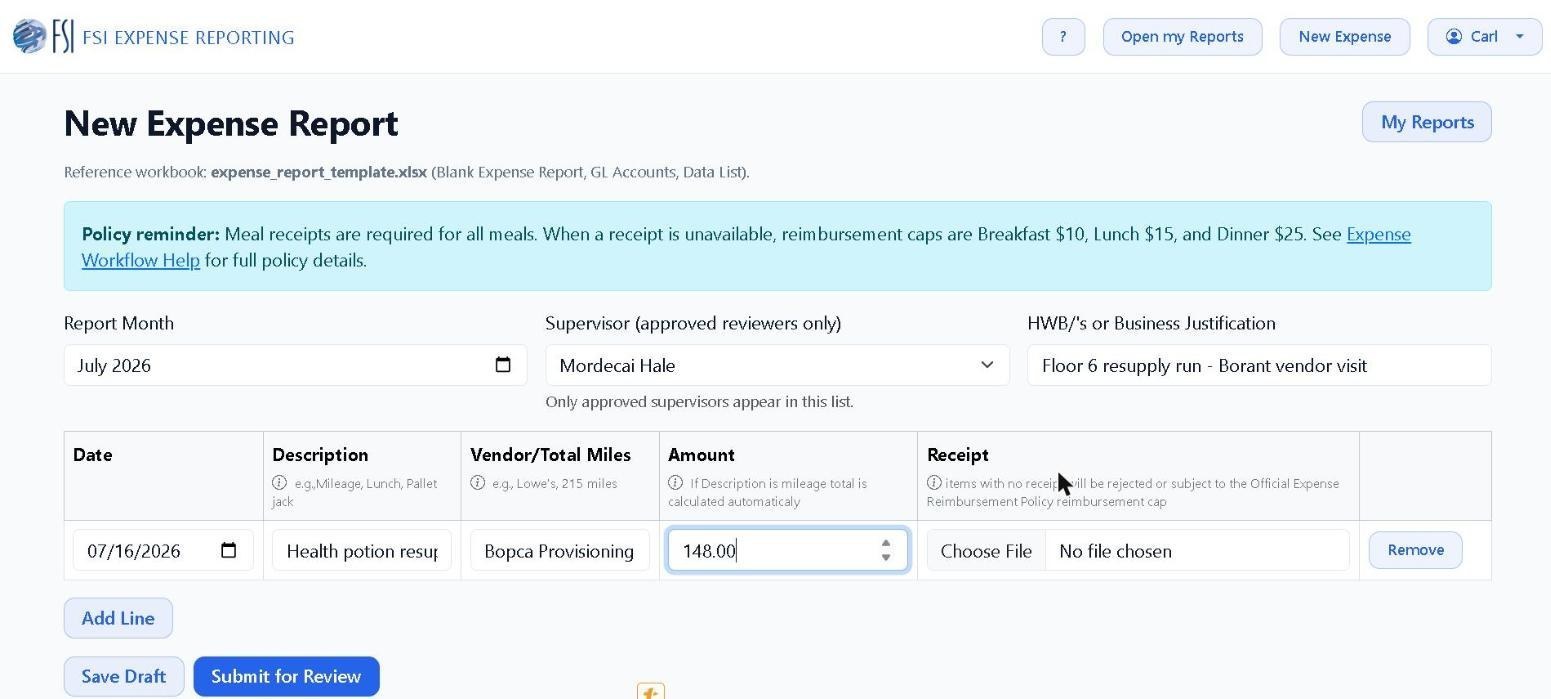
- Use New Expense Report to enter date, category, amount, and business purpose for each expense item.
- Pick your Report Month and supervisor first, then use Add Line for each expense. Only approved supervisors appear in the list.
- Save Draft keeps the report private and editable; Submit for Review locks it and sends it to your supervisor's queue.
- Review totals before submitting so your supervisor sees an accurate request the first time.
- Submit only when all required expenses and notes are included, because supervisors evaluate the full report package.